
Weather & Radar Forecast
WetterOnlineWeather
4.815.04K Reviews
- Version
- Varies With Device
- Installs
- 100.00M
- Age Rating
- Everyone
Screenshots
Our Review of Weather & Radar Forecast
 Analysis by Appyee
I use a weather app most when I need to make a small decision quickly: take a coat, move a walk, or leave before rain reaches my route. Weather & Radar - Storm radar is built for that everyday check, while also giving curious users more to explore. My impression is that it works best when I treat its forecast as a practical guide rather than a promise about exactly what the sky will do.
Quick checks and realistic expectations
The app’s appeal is the mix of an at-a-glance forecast and a map you can inspect when conditions look unsettled. That makes it useful for more than checking the temperature before heading out. I can look at the day’s outlook first, then open radar if I want a better sense of whether rain is nearby or moving across the area. The map gives context that a single weather icon cannot.
For a routine such as walking the dog, cycling to work, or deciding whether to hang laundry outside, I would use the hourly view to compare possible windows rather than plan around one exact minute. Forecasts are inherently less dependable the further ahead I look, so the longer-range outlook is better for spotting a broad pattern than committing to a precise outdoor plan. That distinction helps keep the app useful without expecting it to predict every local change perfectly.
When the radar earns its place
The radar is most valuable when the weather is changing and a general forecast leaves me with a practical question: should I go now, wait, or bring rain gear? I find it more helpful to zoom out first, see the wider movement, and then zoom toward my location. Starting at maximum detail can make a small patch of precipitation seem more decisive than it is; the wider view gives a better sense of the situation around town.
A realistic example is a commute with a short walk at either end. I would check the hourly forecast before leaving, then use the radar shortly before setting off if showers are expected. If the map suggests rain is close, carrying a compact umbrella may be the sensible choice even when the current conditions look clear. This is a planning aid, not a substitute for paying attention to what is happening outside.
It also suits people who like to understand the weather rather than simply receive a number. Wind, humidity, and pressure can add useful context for outdoor plans, but I would not treat every measurement as equally important. Wind may matter more for a exposed bike ride or a picnic than humidity does; for an ordinary trip across town, the forecast and radar are likely enough.
Who will get the most from it
I would recommend the app to anyone who checks local conditions regularly and wants radar, forecasts, and alerts in one place. It can be especially handy for people with flexible routines: someone deciding when to run, a parent planning the walk to school, or a worker who can adjust a short outdoor task around a passing shower. WetterOnline is the developer, and the app’s focus on local weather makes it feel aimed at these practical, repeat-use decisions.
It may be more than a casual user needs. If all you want is a quick temperature from a phone’s built-in weather view, opening a separate app and exploring radar can feel unnecessary. Likewise, people who need highly specialized forecasting for professional or safety-critical decisions should use appropriate authoritative sources rather than rely on a consumer forecast alone. For everyday planning, though, the combination of overview and detail is a sensible middle ground.
How it compares with simpler weather apps
Compared with a basic forecast screen, the main difference is the ability to investigate precipitation visually instead of relying only on a rain symbol or percentage. That extra step is useful when timing matters, but it also means there is more information to interpret. I would not say that more detail automatically makes a forecast more accurate; it makes the app more informative when I know what question I am trying to answer.
Against other full-featured weather apps, the choice comes down to which presentation feels easiest to read and which local forecast you trust for your area. I like having a map alongside the regular forecast, but someone who prefers a minimal screen may find the additional layers and data distracting. Before making it a daily habit, I would spend a few minutes learning where the radar and hourly details are, then keep returning to the parts that genuinely affect my plans.
Exploring the Interface
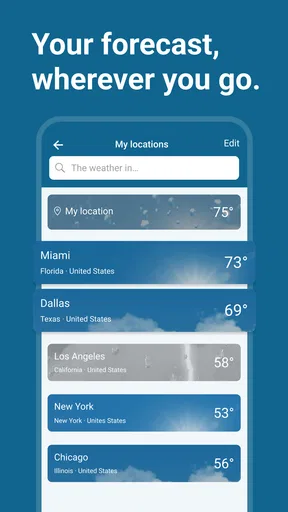
First things first, the Weather & Radar - Storm radar app has a clean and intuitive interface. As soon as you open it, you’re greeted with a neat display of current conditions, temperature, and a quick summary of what to expect throughout the day. The aesthetics are simple and not cluttered, which I appreciate because nobody needs a complicated weather app when you’re rushing out the door.
Navigation is straightforward. There are tabs at the bottom that let you flick between the home screen, radar, and detailed forecasts. It feels like the developers really put some thought into the user experience, making it easy to find what you need without getting lost in endless menus.
Features That Stand Out
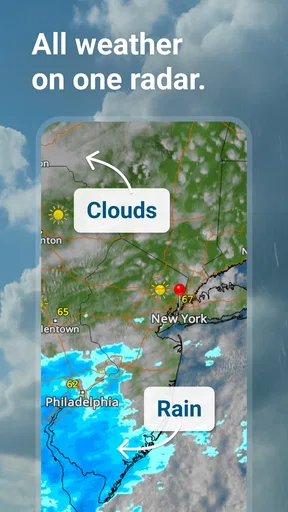
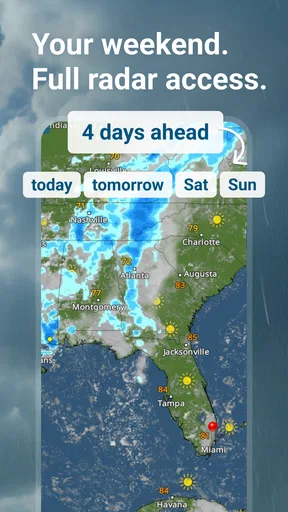
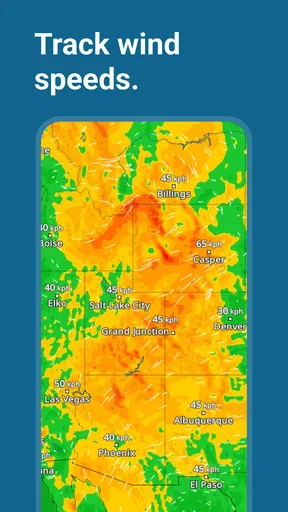
Now, onto the features. What really caught my eye is the interactive radar. It’s not just for show—this thing is detailed! You can zoom in on your specific area to see real-time precipitation, cloud cover, and storm activity. It’s like having a meteorologist in your pocket.
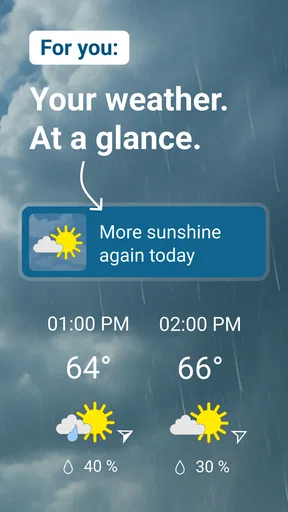
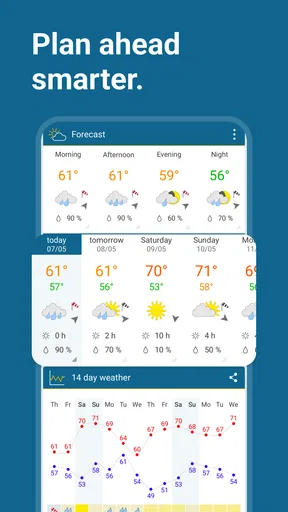
The app also offers hourly forecasts, which have been surprisingly accurate in my experience. I’ve started checking it in the morning to decide if I need to pack a jacket or sunscreen. And, if you’re planning ahead, you can check up to 14 days of weather predictions. It’s not perfect, but it gives a decent idea of what’s coming.
Custom Alerts and More
One feature I didn’t expect to love as much as I do is the customizable weather alerts. Whether it’s a severe storm warning or just a heads-up about rain, you can tailor the alerts to fit your needs. It’s been handy for those days when I’m stuck at work and need a nudge to leave early to avoid nasty weather.
I also noticed there’s a lot of data for weather enthusiasts to geek out on. Things like wind speed, humidity, and atmospheric pressure are all there if you’re into the nitty-gritty details. It’s not something I use daily, but it’s cool to have.
Performance and Reliability
Weather apps are most useful when they open quickly enough for a quick decision, and my experience with this one has felt responsive. The forecast and map have been straightforward to reach, so checking conditions does not turn into a long detour through menus. Still, perceived speed can vary with a connection, device, and the amount of map detail on screen; I would not assume every radar view will feel equally quick in every situation.
When I am checking several things in a row—today’s outlook, the hourly forecast, and then the radar—the app’s layout helps keep that workflow manageable. The trade-off is that a map naturally asks more of the screen and my attention than a simple weather summary. If I only need to know whether to bring a jacket, I can stop at the opening forecast instead of loading more detail. That is a useful habit on an older or busy phone, and it avoids turning a two-second check into a longer browse.
In terms of performance, the app runs smoothly on both Android and iOS. During my testing, I didn’t experience any crashes or significant lags. It seems well-optimized, which is crucial for any app that’s supposed to deliver real-time updates. The radar loads quickly, and I haven’t encountered any bugs that detract from its usability.
Weather information is only helpful if I can get back to it when I need it. In ordinary use, I find the main forecast and radar easy to revisit after switching away to another task. If a map takes longer to appear than expected, I would first check whether my connection is steady before assuming the app itself has failed. It is also sensible to keep a second source in mind during severe conditions: alerts are useful prompts, but they should not be my only basis for a safety decision.
On the downside, the app does come with ads, which can be a bit distracting. But, if you’re willing to pay a small fee, you can remove them for an uninterrupted experience. It’s not a dealbreaker for me, but something to consider if you’re easily irritated by pop-ups.
Device fit, cost, and day-to-day trade-offs
This is a free weather app from WetterOnline, with optional in-app purchases. It is rated for Everyone, and the listed minimum operating system is version 10. Those details make it straightforward to consider for a shared family device, though I would still check compatibility on the device itself before relying on it for a trip or regular routine. Its broad audience does not mean every screen will suit every user: the radar is more useful to someone comfortable reading a map than to someone who wants only one simple answer.
On a phone with limited space or a small display, I would keep the workflow focused: check the current summary first, open the radar only when timing or movement matters, and avoid leaving several information-heavy screens open just because they are available. That is not a special requirement of this app so much as a practical way to keep a weather check light. If ads interrupt your routine, the purchase option may be worth considering; if you rarely open the app, paying to remove them is harder to justify.
The app has a 4.7 average from around 2.4 million ratings, and it has passed 100 million installs. I take that as a sign that many people find the format useful, not as proof that every local forecast will match their experience. It is free to start, so I can try the interface and see whether the radar earns a place in my routine before considering any purchase.
Final Thoughts
Overall, Weather & Radar - Storm radar has impressed me with its user-friendly design and robust features. It’s more than just a weather app; it’s like having a mini weather station in your pocket. Whether you’re a casual user who just needs to know if it’s going to rain, or a weather buff who loves tracking storms, this app has something for everyone.
My main advice is to use the different views for different decisions: the daily summary for a quick check, the hourly forecast for choosing a time, and the radar when you want to judge nearby precipitation. That keeps the extra detail useful rather than overwhelming. If you prefer a bare-minimum forecast, a simpler built-in option may suit you better; if you regularly plan around changing weather, this gives you more to work with.
So, if you’re on the lookout for a reliable and feature-rich weather app, give this one a shot. It might just become your go-to tool for staying one step ahead of the weather. Happy forecasting!
Privacy and Permissions
See what permissions an app requests and how it handles your data.
- Location
- approximate location (network-based), precise location (GPS and network-based)
- Photos/Media/Files
- read the contents of your USB storage, modify or delete the contents of your USB storage
- Storage
- read the contents of your USB storage, modify or delete the contents of your USB storage
- Camera
- take pictures and videos
- Microphone
- record audio
- Wi-Fi connection information
- view Wi-Fi connections
- Other
- view network connections, full network access, run at startup, control vibration, prevent device from sleeping, set an alarm, read Google service configuration
Verdict
Strengths of Weather & Radar Forecast
- Accurate weather forecasts globally.
- Real-time radar updates and alerts.
- User-friendly interface design.
- Customizable weather widgets.
- Detailed storm tracking features.
Limitations of Weather & Radar Forecast
- Frequent ads can be intrusive.
- Some features require premium.
- High data usage for radar updates.
- Occasional app crashes reported.
- Limited offline functionality.
Similar Picks in This Category
View All
Weather - By Xiaomi
Xiaomi Inc.4.1

Weather
OneLouder Apps4.6

AccuWeather: Weather Radar
AccuWeather3.6

The Weather Channel - Radar
The Weather Channel4.6

1Weather Forecasts & Radar
OneLouder Apps4.3

Transparent clock and weather
MACHAPP Software Ltd4.2
You May Also Like
View All

Frequently Asked Questions
What features does the Weather & Radar app offer?
The Weather & Radar app provides detailed weather forecasts, live radar maps, and severe weather alerts. It offers a 14-day forecast, local and global weather updates, and customizable widgets. Users can track storms, view precipitation maps, and receive push notifications for weather changes, making it a comprehensive tool for staying informed.
Is the Weather & Radar app free to use?
Yes, the Weather & Radar app is free to download and use. However, it offers in-app purchases and a premium subscription that removes ads and provides additional features, such as extended forecasts and more detailed radar data. The free version is robust, but premium offers a more enhanced experience.
How accurate is the weather data in the Weather & Radar app?
The Weather & Radar app is known for its accuracy, utilizing advanced meteorological data sources and real-time updates. It provides precise local forecasts and global weather conditions. The app's accuracy is enhanced by continuous updates and user feedback, ensuring reliable information for planning daily activities.
Can I customize the notifications in the Weather & Radar app?
Yes, the Weather & Radar app allows customization of notifications. Users can set alerts for specific weather conditions, such as rain, storms, or temperature changes. Notifications can be tailored to personal preferences, ensuring you receive timely updates that matter most to you, enhancing the app's usability.
Does Weather & Radar support multiple languages?
The Weather & Radar app supports multiple languages, catering to a global audience. Users can switch to their preferred language in the settings, allowing for easy navigation and understanding. This feature makes the app accessible to a diverse range of users, enhancing its international appeal.
